NVIDIA, Adobe, Apple, and Blackmagic published attention-grabbing performance numbers within weeks of one another. Each may be accurate under its stated conditions. None, by itself, tells you how your timeline will play.
The short answer
Each headline multiplier measures one operation against one chosen baseline. Blackmagic's 41x compares AI Speed Warp on RTX Spark with an Arm Windows laptop that has no NVIDIA RTX graphics. Adobe's 2x has no published baseline. Apple's 30% compares base M6 with base M5. In Windows Central's Premiere Pro Beta export tests, RTX Spark trailed RTX 5060 and RTX 5080 laptops. Time your own projects before you buy.
If you run a post team, a hardware request may already be in your inbox. NVIDIA's RTX Spark laptops started shipping on October 16, 2026. Apple's 14-inch M6 MacBook Pro becomes available November 6. Blackmagic is offering 20% off DaVinci Resolve Studio through November 20, and its announcement explicitly connects the promotion to AI performance gains on both platforms.
What was actually announced
NVIDIA's RTX Spark combines a Blackwell RTX GPU and Arm CPU with as much as 128GB of unified memory. Systems from ASUS, Dell, HP, Lenovo, Microsoft, and MSI start at $2,599. NVIDIA says the platform can edit camera-native 4:2:2 video and that native Photoshop and Premiere support is available through beta releases. Those are meaningful capabilities, but beta support and production-readiness are not the same thing. See NVIDIA's platform update.
Adobe says its optimized Photoshop, Premiere, and Substance 3D applications deliver up to 2x faster AI processing, editing, color, and effects. The announcement does not identify baseline hardware or publish a test method. The same 2x figure also appeared in Adobe's May 31 preview, months before retail hardware arrived.
Blackmagic's numbers are more specific. Its announcement says that, compared with M5, M6 Macs run AI SuperScale almost 70% faster when upscaling HD to 8K and AI Speed Warp more than 60% faster. On RTX Spark, Magic Mask tracking is up to 17x faster and Speed Warp up to 41x faster than on Arm-based Windows laptops without NVIDIA RTX graphics. DaVinci Resolve Studio 21.1.2 later added up to 14x faster IntelliSearch analysis on M6 computers running macOS 27.
Apple's broad platform claims are up to 30% faster graphics and up to 25% faster on-device AI workloads than M5. Apple does not tie either figure to a named video application.
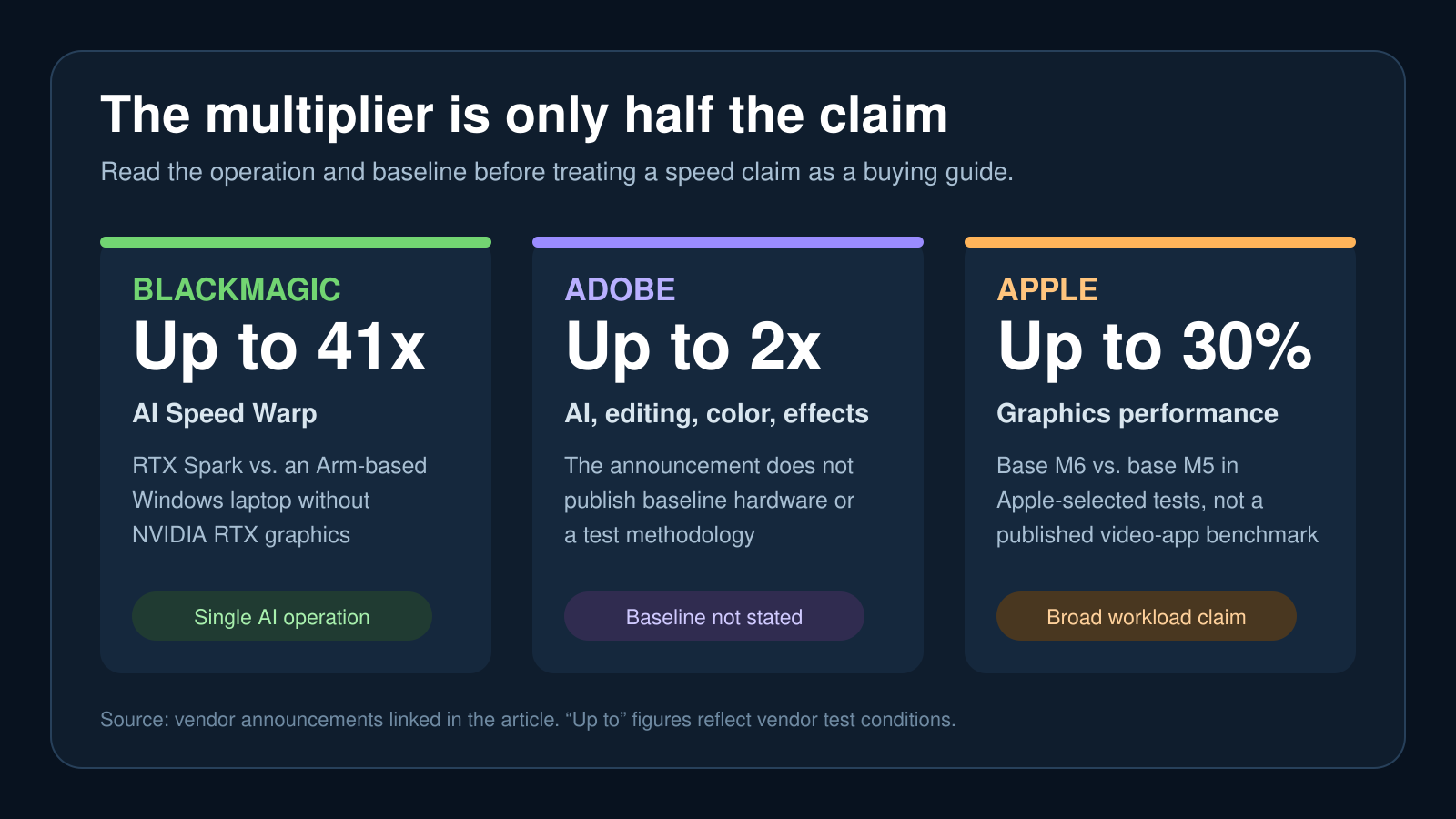
A multiplier is useful only when the operation, baseline hardware, software build, and test conditions match your workflow. Graphic: FMC; sources linked in this article.
Read the baseline, not the multiplier
Blackmagic's 41x figure compares Speed Warp on RTX Spark with an Arm Windows laptop that has no NVIDIA RTX graphics. The result demonstrates how much that operation benefits from RTX acceleration. It does not tell you how RTX Spark compares with an RTX 5060 or RTX 5070 laptop that may cost less.
The M6 figures compare base chip with base chip on one upscale and one retime. Apple has announced only the base M6 version of the 14-inch MacBook Pro so far, so teams comparing it with an M5 Pro or M5 Max do not yet have a vendor-supplied video benchmark.
Adobe's 2x figure has no published baseline or methodology. Treat it as a directional claim until Adobe publishes reproducible test details.
Most importantly, each headline number isolates a task. It does not measure multicam playback, scrubbing, export queues, plug-in performance, or the daily grind of a mixed-codec timeline.
What independent testing shows so far
Windows Central tested a top RTX Spark configuration with 128GB of memory in Premiere Pro Beta, the build containing RTX Spark optimizations. In its H.264 export tests, RTX Spark trailed the tested RTX 5060 and RTX 5080 laptops.
| Premiere Pro test | RTX Spark Surface Laptop Ultra | RTX 5060 Lenovo Yoga Pro 9 | RTX 5080 Lenovo Legion 9 |
|---|---|---|---|
| 1080p H.264 export, GPU effects | 42.0 s | 32.1 s | 20.2 s |
| UHD H.264 export, GPU effects | 81.4 s | 64.1 s | 40.2 s |
| Procyon video editing score | 29,595 | 38,262 | 58,497 |
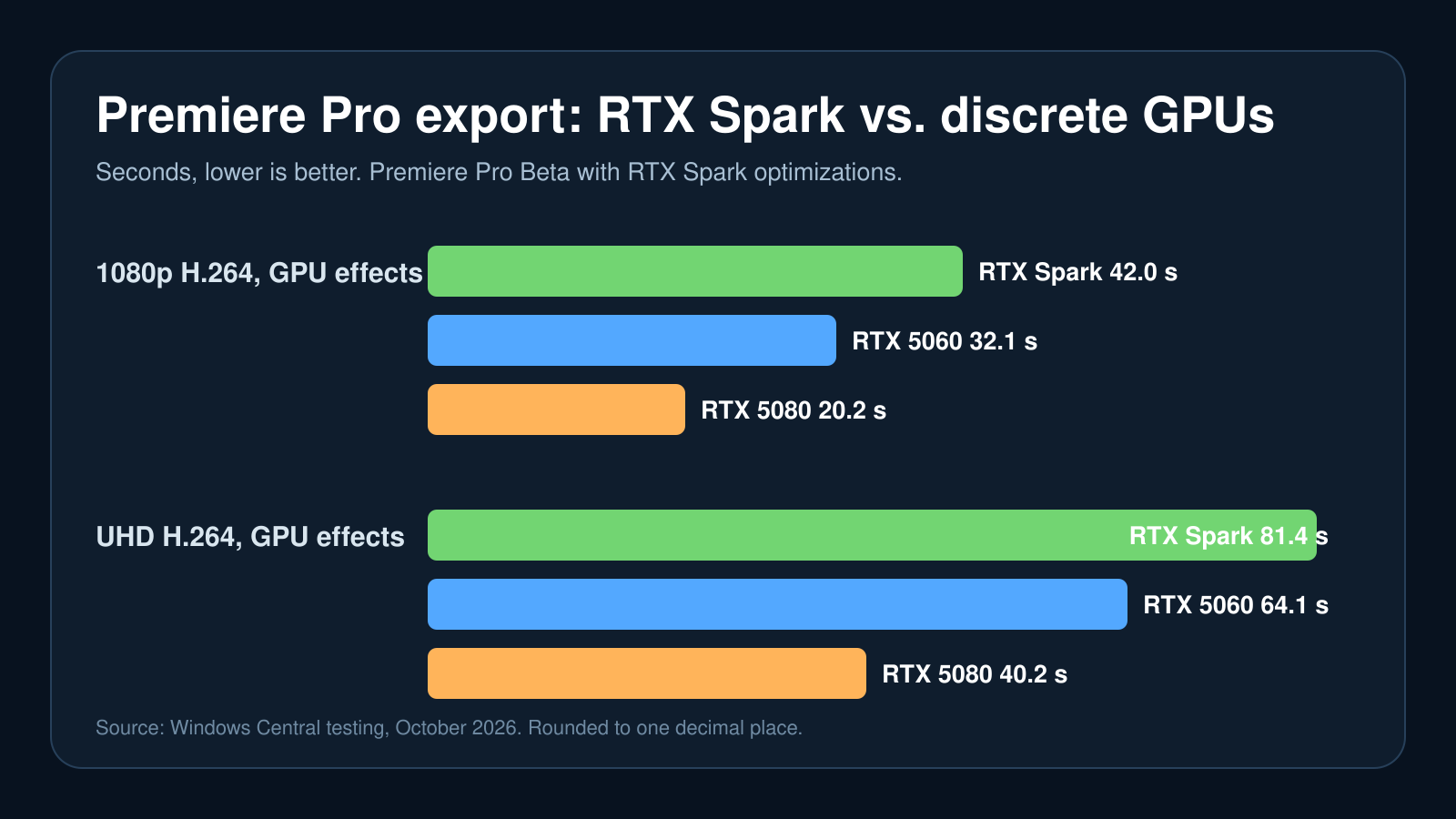
Windows Central's Premiere Pro Beta tests. Lower export time is better. Laptop cooling and power limits can change discrete-GPU results. Graphic: FMC. Benchmark source: Windows Central.
RTX Spark won decisively in quantized AI image generation. Its Procyon Stable Diffusion 1.5 INT8 score was 11,294, compared with 1,801 for the tested RTX 5060 system. The reviewer also found little performance change between plugged-in and battery operation and concluded that RTX Spark is most compelling for people who run local AI workloads throughout the day.
Notebookcheck's broader analysis placed RTX Spark near mobile RTX 5070 performance in several GPU tests but found its DaVinci Resolve showing less impressive. The publication also noted that unified memory could become an advantage when RAW-heavy projects exceed a discrete GPU's VRAM.
The evidence points to a nuanced conclusion: RTX Spark can deliver discrete-GPU-class creative performance in an efficient chassis, while its clearest wins appear in AI workloads optimized for its architecture. These remain launch-period tests on new or beta software, and independent M6 video tests will not be available until the Mac ships.
The compatibility questions that never make the headline
RTX Spark runs Windows on Arm. Adobe's current Windows on Arm support page, last updated June 17, documents Qualcomm systems rather than RTX Spark. It says Intel-compiled plug-ins do not load in the Arm-native Premiere 26.0 build and lists ProRes RAW, ARRIRAW, Canon Cinema RAW Light, Sony X-OCN, and R3D among formats expected in future versions.
Because NVIDIA says RTX Spark support is arriving through Adobe beta releases, that older compatibility page may not describe every capability in the launch beta. It also means teams should verify their exact plug-ins, control surfaces, and camera formats on the precise build they plan to deploy.
Blackmagic lists native Windows Arm support for RTX Spark in DaVinci Resolve 21.1 and requires NVIDIA Studio Driver 616.0 or newer. Check the current readme from the Blackmagic Design support page before deployment.
What to do this month
- Name the three operations that actually block your team. If the bottleneck is Magic Mask tracking on long interviews, Blackmagic's 17x figure is relevant. If the bottleneck is your export queue, it is not.
- Time a representative project. Export a typical ten-minute sequence, then time one Magic Mask track, one Speed Warp pass, and one search-analysis pass on a demo unit. Record the software version, driver, power mode, codec, resolution, and plug-ins.
- Check plug-ins and formats before buying. Every Intel-only plug-in and unsupported RAW format is a production constraint, regardless of benchmark speed.
- Separate the software decision from the hardware decision. Resolve Studio at $236 is a discount on software that also runs on hardware you already own. A sale does not require a new workstation.
- If the purchase can wait two weeks, let it. M6 systems arrive November 6, and the Resolve promotion runs through November 20. That creates time for independent tests and compatibility checks.
For teams that want guided practice before standardizing a workflow, FMC lists Introduction to Editing with DaVinci Resolve on November 18 and Color Grading and Finishing with DaVinci Resolve 101 on November 23. FMC also offers a 90-minute Intro to NVIDIA NvRTX for M&E session on request.
The multipliers may be honest about what they measure. Your buying decision still has to account for everything they leave out. Buy for the operations you time yourself.
Frequently asked questions
Is RTX Spark really 41x faster for video editing?
Not across the board. Blackmagic's up-to-41x figure applies to AI Speed Warp in DaVinci Resolve, measured against an Arm-based Windows laptop without NVIDIA RTX graphics. In Windows Central's Premiere Pro Beta tests, RTX Spark took 42.0 seconds for a 1080p H.264 export, compared with 32.1 seconds on an RTX 5060 laptop and 20.2 seconds on an RTX 5080 laptop.
How much faster is the M6 MacBook Pro than M5 for video work?
Apple claims up to 30% faster graphics and up to 25% faster on-device AI than M5, without naming a video application. Blackmagic says M6 Macs run AI SuperScale almost 70% faster when upscaling HD to 8K and AI Speed Warp more than 60% faster than M5. Independent M6 video tests will not be available until the Mac ships on November 6.
Do Premiere Pro plug-ins work on RTX Spark laptops?
Not all of them. RTX Spark runs Windows on Arm, and Adobe's Windows on Arm support page says Intel-compiled plug-ins do not load in the Arm-native Premiere 26.0 build. It also lists ProRes RAW, ARRIRAW, Canon Cinema RAW Light, Sony X-OCN, and R3D among formats expected in future versions. Verify your plug-ins and camera formats on the exact build you plan to deploy.
Should I buy DaVinci Resolve Studio during the sale if I'm not replacing hardware?
Treat it as a separate decision. Blackmagic's 20% discount brings Resolve Studio to $236 through November 20, and the software runs on hardware you already own. The sale does not require a new workstation.
How should a post team test a workstation before buying?
Name the three operations that actually block your team, then time a representative project on a demo unit: export a typical ten-minute sequence, then time one Magic Mask track, one Speed Warp pass, and one search-analysis pass. Record the software version, driver, power mode, codec, resolution, and plug-ins.
Free webinar • macOS 27 Golden Gate
See what’s new in macOS Golden Gate
Siri AI, Visual Intelligence on Mac, the new Spotlight and rewritten Mail search, walked through by the trainers who teach FMC’s Golden Gate classes. Wednesday, December 2 or Tuesday, January 12, at 1 PM ET.
Sources
- NVIDIA: RTX Spark PCs available today
- Adobe: Adobe and NVIDIA expand collaboration
- Apple: 14-inch MacBook Pro with M6
- Blackmagic Design: special pricing and performance claims
- Windows Central: RTX Spark review and benchmarks
- Notebookcheck: RTX Spark analysis
- Adobe: Windows on Arm support
Header image source: NVIDIA. Editorial treatment by FMC. Claims, prices, and class dates were checked on November 3, 2026.